Rent a Phone Number
In this guide, you will learn how to rent a phone number. A rentable phone number is also called a DID (Direct Inward Dialing).
There are two ways to set up a phone number:
- through CarrierX Portal via the user interface
- programmatically via the CarrierX API
Depending on your preferences you can select either of them.
To be able to use a rented phone number to receive calls, you first need to assign a trunk group to that number.
Rent a Phone Number Using Portal
Let's rent a phone number through the Portal.
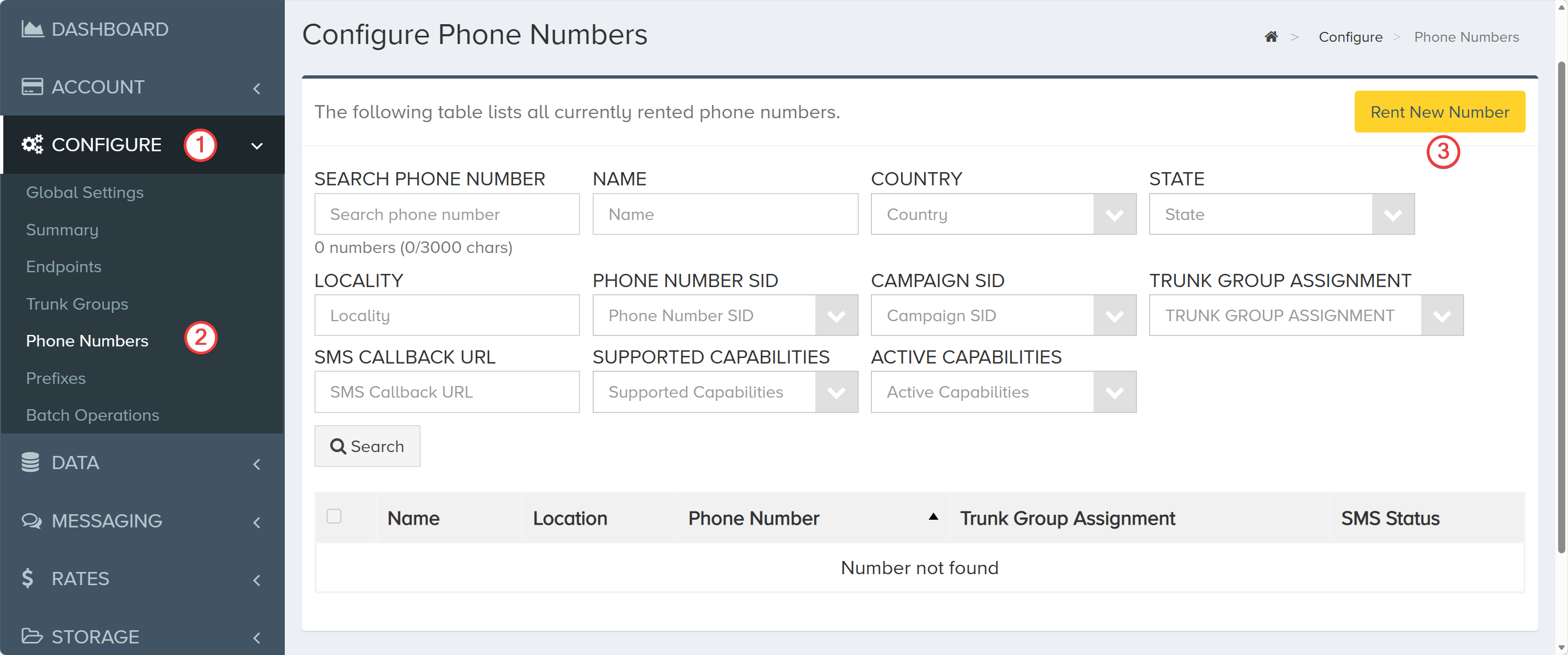
In the left-hand navigation menu, select CONFIGURE > Phone Numbers. Then, in the top-right corner, click the Rent New Number button.
If you would like to select a specific geography or an area code, select a State and Area Code. Click the Search Availability button.
When the Search Availability button is clicked, the phone numbers list below will populate with numbers available for the selected state, area code and capabilities.
Select a phone number and click the Rent 1 selected numbers button in the bottom-right corner.
The Rent Phone Numbers modal will appear. Check Yes, I want to rent these Phone Numbers and click the Rent Numbers button.
We have rented a phone number through the portal. In the next section, we will go over renting a phone number programmatically.
Rent a Phone Number Using REST API
In this Quick Start, we will rent a random phone number using a POST request.
To be able to rent a phone number, you are going to need a security token.
To rent a phone number, send a POST request to the /phonenumber/dids endpoint. Sending an empty body with the POST request will assign a random number.
curl -X POST \
'https://api.carrierx.com/core/v2/phonenumber/dids' \
-H 'Content-Type: application/json' \
--data-binary '{}' \
-H 'Authorization: Bearer 5ebc03d6-8b2b-44ad-bf65-72d4f1491dda'
A successful request will return a 200 status code along with a response that looks like the following:
{
    "active_capabilities": 4,
    "attributes": {},
    "callback_url": null,
    "capabilities": 31,
    "country_code": "USA",
    "did_group_sid": null,
    "did_sid": "f448e2c3-88c1-4cd1-8cf2-3567c16e0794",
    "in_country_format": "(516) 206-5575",
    "international_format": "+1 516-206-5575",
    "locality": "NEW YORK",
    "name": "(516) 206-5575",
    "partner_sid": "e00430c3-a7d0-4666-ab5c-f7202448382f",
    "phonenumber": "15162065575",
    "price": "0.6",
    "state": "NY",
    "transformations": [],
    "trunk_group_sid": null
}
Next Steps
You have rented a phone number! The next step is to assign a trunk group to that phone number so you can start making calls.